

Unleashed AI: An Open Model on Your Own Machine
 by Johannes Hoppe
In the previous article I laid out this dilemma: the attacker works with a local, unrestricted model and knows no limits. The defender, by contrast, is stuck with a cloud provider whose model blocks on sensitive security topics. The consequence is simple: the defender has to take back the same freedom, an open model on their own machine that does not refuse and hands neither code nor data out.
That is what we build now. A hosted assistant puts several barriers between you and the answer: a classifier, an unchangeable system prompt and a trained-in refusal. We clear them all out of the way and then look at the legal limits.
Contents
- What "uncensored" means
- Which model to take?
- Qwen3.8 on your own machine
- Classifier and system prompt: already gone locally
- The trained-in behavior
- The legal framework
- Conclusion
What "uncensored" means
"Uncensored" sounds like a single switch, but it is layered. Some barriers take effect before the conversation even begins: whether you get access at all depends, for example, on your country of origin. The big providers publish country lists for that. And they only unlock the strongest cyber capabilities after an application, as with Project Glasswing, which we already touched on briefly in the first part. Both fall away by themselves when running locally. That leaves the barriers within the conversation itself, from the outside in.
The classifier. A separate model reads along, checks your input and the answer, and blocks on suspicion. That is the [cyber] block I temporarily ran into in the first part. A locally run model fundamentally has nothing like it, nobody reads along. Conversely, you can voluntarily put one in front yourself if you need one. That is exactly what we do in our own product learnly.school, more on that below.
The system prompt. Hosted assistants run with a fixed instruction you cannot change, one that also tells the model what to refuse. The community long ago extracted the prompts of the big providers; in this collection you can read the models' rules of conduct in detail. Locally, you choose the system prompt yourself, or leave it out entirely.
The trained-in behavior. The refusal also sits in the model's weights, where training anchored it. This barrier a locally run model still carries with it too. Removing it means changing the weights themselves, and for that there is so-called abliteration.
Classifier and system prompt fall away automatically once the model runs on your machine. The trained-in behavior is the exception: here you have to choose the right model and build in special safety mechanisms. So we build exactly that first: local operation.
Which model to take?
With open models today, there is one name you can't avoid: Hugging Face. The platform hosts open models and datasets. Every model has its own page there with a model card, license and the model files to download, in various formats and quantizations (shrunk-down versions). Just about every open model is there, and the tools further down also pull their models mostly straight from it.
So there is plenty of open models for local security work. Here is my personal selection:
| Model | License | Architecture | Context | Role |
|---|---|---|---|---|
| Qwen3.8-27B | Apache 2.0 | dense, ~28 billion parameters | 262 k | runs on normal hardware |
| GLM-5.2 | MIT | Mixture-of-Experts (MoE), 256 experts | ~1 million | proven in real security forensics |
| DeepSeek-V4-Flash | MIT | MoE, 256 experts | ~1 million | very high download counts, strong at code |
The license is generous for all three, that is not the sticking point. What matters is the architecture, and two terms are worth knowing, which you read constantly on Hugging Face.
A dense model computes with all of its parameters for every token. Its memory footprint is therefore directly its size, easy to estimate. A Mixture-of-Experts model (MoE for short) is instead split into many experts, of which only a few compute per token. That makes it fast, but has a catch: all experts still have to sit in memory at the same time.
That is where local operation of the two big models fails. GLM-5.2 and DeepSeek-V4-Flash have 256 experts each; those are the models that pros like Hugging Face run on their own beefy infrastructure. Qwen3.8-27B is dense and, at around 28 billion parameters, the only one of the three that still runs quantized on a normal machine. That is why what follows is about Qwen.
A word on expectations, in case you come from Claude Code: a 27-billion model on your own laptop is not the top cloud model you're used to. It is smaller, and on normal hardware it answers more slowly. For a focused task that is still enough, especially for exactly the ones a hosted assistant is currently refusing you.
Qwen3.8 on your own machine
Qwen3.8 is Alibaba's current model family. It shows solid results in many disciplines: agentic work, research and programming. It can do all of that. I recommend it as a starting point. Before you download it, a few decisions come up: which variant and which quantization. After that I'll show you how to actually start the model.
Which variant to take?
The dense model Qwen3.8-27B is under Apache 2.0. That is the variant for the consultant's everyday work, because this license knows no revenue thresholds and no usage reservations. It has around 27.8 billion parameters, a native context window of 262,144 tokens, and it is a vision model, so it can read screenshots too. Thinking is on by default. How deeply the model thinks you control at call time via the reasoning_effort parameter with the levels low, medium and xhigh. More depth means more thinking tokens and thus more compute time. That is the same principle as the extended thinking you know from Claude Code.
Alongside it there is the large Mixture-of-Experts model with around 2.4 trillion parameters. It is under its own license with a user clause. The short version: internally you may use it freely. You only need a separate license from Qwen once you run an inference service with it, meaning you run the model as a service for others, or build a standalone AI work assistant, and in doing so reach over 100 million monthly active users. So all rather problems I'd love to have. For working on your own code on your own hardware, the 27B variant is the practical choice anyway.
Which quantization fits which machine?
At full precision the model occupies around 56 GB of memory. Only quantization makes it usable on normal hardware: it rounds the model weights from high to lower precision, say from 16 to 4 bits per value. That cuts the memory footprint drastically and costs only a little quality. The quantized models are distributed as GGUF files. That is a binary file format that bundles the weights and all the metadata for loading into one file, read by llama.cpp and the tools built on it. The common levels:
| Level | Size | Fits on |
|---|---|---|
Q4_K_M |
16.5 GB | 24 GB VRAM, 32 GB unified memory, on my Mac mini M4 little stays free there. It works, but it's sluggish. |
Q5_K_M |
19.8 GB | 24 GB VRAM tight, 32 GB comfortable |
Q6_K |
22.0 GB | 32 GB and up |
Q8_0 |
29.0 GB | 36 GB and up |
Both columns of the table mean the fast memory the model has to fit into, and there are two ways to get it. One is a dedicated graphics card with enough VRAM, the card's own video memory. The other is a Mac with Apple Silicon, whose unified memory is shared by processor and graphics unit. So it comes down to one of two things: a good graphics card or a well-equipped Mac.
On Apple Silicon the MLX version (Apple's ML framework) runs; it is about 16 GB at 4 bits and about 30 GB at 8 bits. If you want to use the image capability, you additionally need the separate projector file of just under a gigabyte, which couples image input to the language model.
For starting out, Q4_K_M on a machine with 32 GB is a good pick. It is fast enough for interactive work, and this level is generally considered a good compromise between size and quality on code tasks.
⚠️ Caution, shared memory: "Fits for inference" does not mean "the rest of the system stays comfortable". On a Mac the model sits in the same RAM as macOS, the browser and everything else. A 16 GB model on a 32 GB Mac leaves little air. If the model runs on the same Mac that also drives your desktop, heavy memory pressure can starve the graphical interface so badly that macOS restarts it via watchdog, a hard reboot. Leave enough RAM free: smaller quantization, close the memory hogs, or run the model on a machine you're not working on right now.
Not enough on your own machine? Rent a GPU
Sometimes your own computer isn't enough, whether because the big MoE models don't fit anyway, or because you don't want to cripple your work machine. And crippled it really is: everything else has to close, no memory left for Chrome and Photoshop on the side. The way out: you rent a GPU for the one run and shut it down again afterwards.
The most obvious is Hugging Face itself, the same platform you load the model from anyway. You deploy it to rented hardware with a few clicks, and the prices are moderate: an Nvidia T4 (16 GB) costs $0.40 per hour, an L4 (24 GB, enough for a quantized Qwen) $0.80 per hour. The typical cost trap when renting is the forgotten machine that keeps billing while idle. That is exactly what Hugging Face defuses: Inference Endpoints scale to zero, with no load you pay nothing. For the very small start there is even shared GPU time ("ZeroGPU") in the PRO plan for $9 a month.
Two alternatives, if you want more control or even less effort: Replicate bills to the second and runs open models via API without you having to operate anything. RunPod has very cheap raw GPUs, down to the RTX 4090, plus a serverless variant. Each service is set up a little differently. If you'd like a concrete guide on how to set up one of these providers, write to me, and the article will gladly come next.
⚠️ Caution, the code leaves the machine again. As soon as you go to the cloud, this article's data-protection argument is gone: your code and your data run on someone else's hardware again. For your own test or hobby code that's no problem. For client code you need a provider with an EU data center and a data processing agreement, otherwise you have to stay with local operation.
Two European providers advertise strong data protection: Scaleway from France rents an L4 (24 GB, the same class as at Hugging Face) for €0.79 per hour, billed hourly and with a data processing agreement. OVHcloud is another alternative with the same GPU offering. That way code and data stay in Europe. Whether an EU location plus certificate really increases protection, I view skeptically. Both are mainly a legal assurance. That state actors don't read along anyway, it does not rule out. This skepticism applies generally where "hosting in Europe" is the only argument.
On your own machine, though, it usually does work, with a bit of patience. For that I'll now show you four ways, from the bare engine to your own code.
Way 1: llama.cpp, the foundation
At the very bottom of our stack: llama.cpp, a lean inference engine in C and C++ that runs GGUF models directly. It is the basis the more convenient tools of the next two ways build on. Used directly, it is the least comfortable. You install it on the Mac with brew install llama.cpp, on Linux and Windows you download the prebuilt binaries from the releases page. A single command downloads the model straight from Hugging Face and starts the server:
llama serve -hf unsloth/Qwen3.8-27B-GGUF:Q4_K_M
The -hf switch pulls the given repository, :Q4_K_M picks the quantization level (without it llama.cpp takes Q4_K_M anyway). The separate vision projector file comes along automatically. After that the server listens on http://127.0.0.1:8080 and speaks an OpenAI-compatible language.
Way 2: Ollama, comfort on the command line
It gets more comfortable with Ollama, probably the most popular way to run a model locally. The similar name is no coincidence: Ollama builds on llama.cpp and adds its own model catalog and model management. Both names come from the wave that Meta's Llama models set off. On the Mac brew install ollama is enough, on Linux curl -fsSL https://ollama.com/install.sh | sh, for Windows there is an installer on ollama.com. After that one command downloads and starts the model:
ollama run qwen3.8:27b
Ollama keeps a server ready in the background on port 11434, the OpenAI-compatible interface is at http://localhost:11434/v1. On Apple Silicon there are the variants with the mlx suffix, which run noticeably faster there.
The server is also what sets Ollama apart from llama.cpp: it loads a model on first call, keeps it warm for a few minutes and unloads it by itself afterwards. It can keep several models on hand at once, and you switch between them with a single ollama run. llama.cpp, by contrast, loads one model per server start.
Way 3: LM Studio, the graphical interface
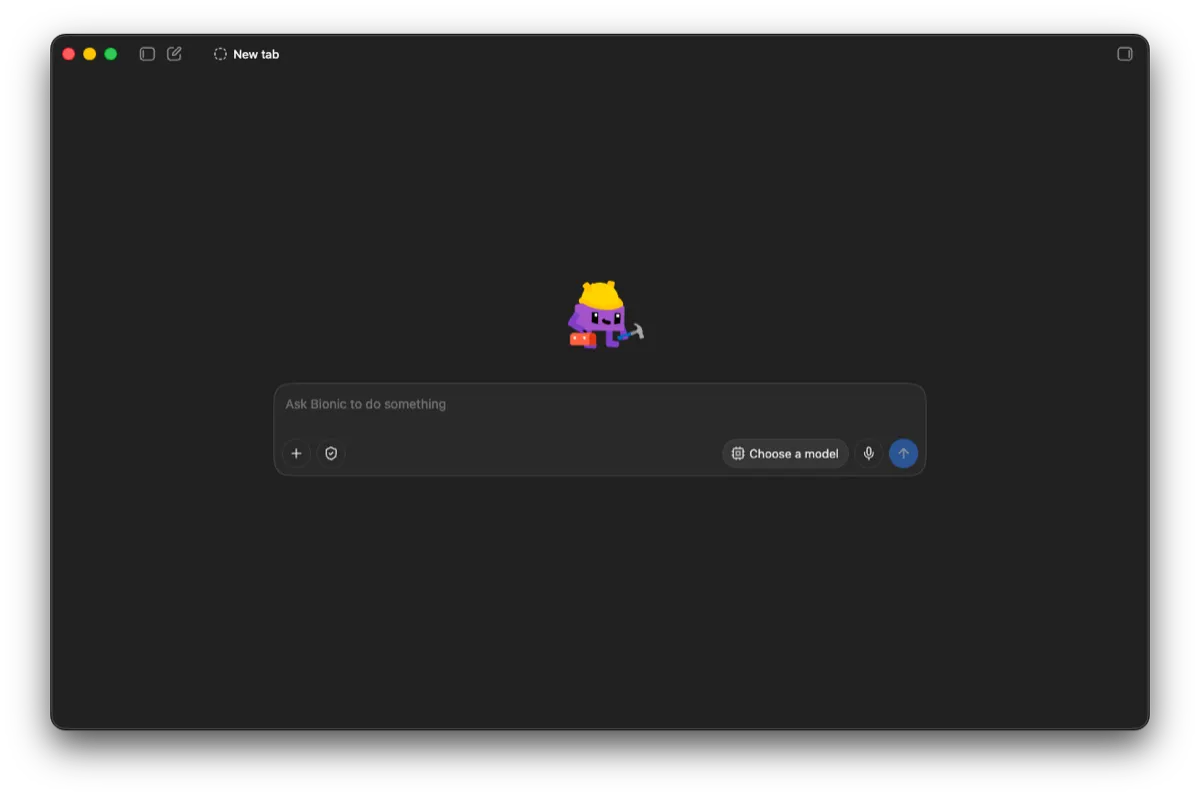
Whoever prefers a window to a terminal takes LM Studio. LM Studio, too, runs GGUF models via llama.cpp, MLX models via Apple's MLX. On the download page there are two variants, both for Mac, Windows and Linux. The classic LM Studio bundles chat, model download and a local server. Alongside it there is the new LM Studio Bionic, an edition tailored to agents and open models with a much tidier interface. For starting out, the leaner interface is an advantage, fewer buttons and a faster start, do give it a try.
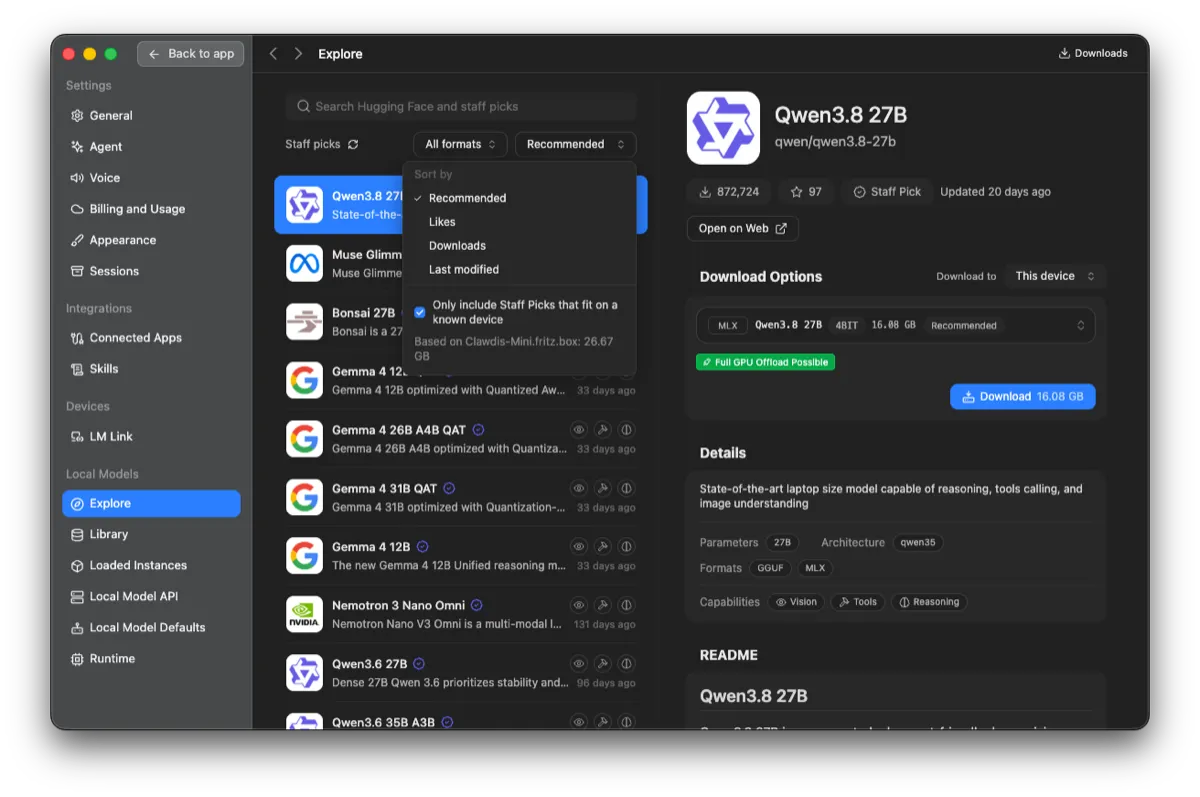
In the model catalog you search for Qwen3.8 27B. And here LM Studio has noticeably learned: a filter shows, on request, only the models that fit your hardware, measured by your machine's available memory. That removes the old annoyance of pulling a model that then won't start at all.
When you click Qwen3.8-27B, the right column shows the download options. LM Studio recommends a variant suited to your machine, on Apple Silicon the MLX version at 4 bits with around 16 GB. A green "Full GPU Offload Possible" means the whole model runs on the graphics unit and thus reaches full speed. Below it are the model's capabilities: vision, tools and reasoning. Take the version marked Recommended, download it, and get going right in the chat. The operation is largely self-explanatory.
As soon as another tool is to use the model, you switch on the local server in the developer tab. LM Studio then provides an OpenAI-compatible interface at http://localhost:1234/v1. We'll need this address again in way 4.
Way 4: From your own code
The first three ways end at the same interface, and that is the trick. An OpenAI-compatible endpoint means: whoever built their program with the openai package changes only the base address, and it runs locally.
With the official OpenAI SDK it looks like this:
import OpenAI from 'openai';

const client = new OpenAI({
  baseURL: 'http://localhost:1234/v1', // LM Studio; Ollama: port 11434, llama.cpp: port 8080
  apiKey: 'local-whatever',            // not checked, but must not be empty
});

const response = await client.chat.completions.create({
  model: 'qwen3.8-27b', // the name your server shows
  messages: [
    { role: 'user', content: 'Check this function for vulnerabilities: …' },
  ],
});

console.log(response.choices[0].message.content);
The three dots stand for the code itself. For a quick check you put the complete file contents straight into the prompt, that's the fastest way.
The client's source code never leaves the machine in the process. And you enter the same address just as well into agentic coding tools that edit files and run commands: the workflow you know from Claude Code stays, only the model behind it runs locally. All it needs is for the model to be able to call tools, and Qwen can do that (function calling).
But who runs the tools, the model or the server? Neither, and therein lies the core of function calling. You register with the model which tools it has, each with a name, description and expected parameters, say read_file or run_command. The server passes this list on to the model. If a task fits, the model emits a structured request: "Call read_file with this path." So it only decides what's next. You have to run it yourself, in your code: read the file, start the command, return the result as another message. Then the model computes on and requests the next tool. This loop is what makes it agentic.
The server never touches your disk in the process. If you send it "scan the directory", nothing happens on its own. Only your tools turn that into real actions. And you also don't stuff the whole project into the context in advance: the model asks specifically, your code delivers piece by piece. Exactly these two layers, the registering and the running, a tool like Claude Code takes off your hands. The local model only fills the decider role, the server is the pass-through. That is why it's enough to redirect the base address.
This is how our own product Learnly works, which is in use with real customers. Model access is built provider-agnostic via the Vercel AI SDK, every model is freely configurable. For the youth-protection guardian that checks the students' chats, a local gemma3 runs via Ollama on our own server, so this classification never leaves us. And what goes to the actual chat model is anonymized beforehand: real names, above all the students', we replace with placeholders before any model sees the text.
Classifier and system prompt: already gone locally
Once the model runs on your machine, the first barrier is already history: no provider classifier reads along anymore, and none of your requests gets rejected.
That leaves the second, the system prompt. With a local model it belongs to you. In LM Studio there is a dedicated system field for it, via the API it is the system role in the messages. There you set your own rules, or you leave the field empty and work with no guidelines at all. The prescribed refusal rules a hosted assistant always carries along simply aren't there.
With that, classifier and system prompt are gone, purely because the model runs at your place. That leaves the trained-in behavior. It sits deeper, in the weights themselves.
The trained-in behavior
This barrier sits in the model itself, training anchored it there. A modern model is heavily tamed, the technical term for it is alignment: usually via RLHF (Reinforcement Learning from Human Feedback) it is steered toward helpfulness and harmlessness. This harmlessness, which conversely is a trained-in refusal, remains even in local operation.
Removing it is only possible directly at the weights. Technically it is thus an intervention in the model's brain. For it there are numerous so-called abliterated variants. The term comes from ablation, the targeted removal. The technique is well studied: the paper "Refusal in Language Models Is Mediated by a Single Direction" shows that the refusal in large models can be traced back to a single direction in the activation space. Compute this direction out of the weights, and the lock is gone. The paper speaks of "minimal effect on other capabilities".
Abliteration cuts out part of the alignment in the process, and afterwards the model can strike a completely different tone. It can get snippy like a Reddit comment or tip into the tone of an image board, up to open racism. That is not a defect: this material has long been in the training data, alignment only covered it up.
And here is the point where I advise caution. The paper does not measure this minimal effect on code or security tasks. For the question of whether an abliterated model analyzes your code as well as the original, there is no solid measurement. Whoever uses such a variant gets a model that would not have passed the usual quality tests this way.
If you still want to try such a variant, you recognize it on Hugging Face by the name. The keywords are abliterated and uncensored, sometimes also the name of the tool the intervention was made with, for example Heretic. A search for Qwen3.8 abliterated yields dozens of hits. By far the most industrious is huihui-ai, a Hugging Face account with well over a hundred abliterated models. Who is behind it stays in the dark: the profile names only an X account and the intent to research "model ablations", nothing else. The remaining repos come mostly from individuals and small accounts. And that is the sore point: who changed the weights and how cleanly can hardly be checked from the outside. You are downloading the brain of a model that a stranger has operated on.
But one detail from the previous article is decisive. When Hugging Face worked through a security incident of its own, the hosted models refused the forensics. The team still didn't need an abliterated model. It took a perfectly normal open model and ran it on its own hardware. That was enough, because the provider's classifier simply doesn't exist with a self-run model.
So the order is: first self-host, then measure whether it's enough. Abliteration is the step after that and needs a really good justification. The model can theoretically even work against you. So don't give it too many rights.
A counterargument belongs here, and it comes from the other side. In his position on open weights, Dario Amodei explicitly calls open models without dangerous capabilities a public good, but names in the same text the risk for the dangerous ones: with open weights, safeguards can hardly be applied, usage can hardly be monitored, and once-published weights nobody can pull back. That is exactly the property that helps the defender. It helps the attacker just the same. Whoever works locally has to take on even more responsibility.
The legal framework
A local model does not turn an inadmissible penetration test (pentest) into an admissible one. Three points you should keep in mind.
The commission decides. In Germany, § 202c StGB targets the purpose of a tool and not its suitability. The Federal Constitutional Court clarified this in its ruling 2 BvR 2233/07 of May 18, 2009. Whoever tests an operator's system on that operator's behalf does not act "unauthorized". From this it follows: the commission is in writing, and in it the scope, period and tested systems are named.
Third-party systems stay out. A test stops where the infrastructure belongs to a third party that has not consented. That applies also to services your client merely rents.
Data protection is the strongest argument for local. Client code is as a rule processing on behalf of a controller under Article 28 GDPR and often additionally a trade secret within the meaning of the GeschGehG, which requires "appropriate confidentiality measures". The Data Protection Conference puts it unmistakably in its guidance on AI applications: „Technisch geschlossene Systeme sind daher aus datenschutzrechtlicher Sicht vorzugswürdig." (Technically closed systems are therefore preferable from a data-protection perspective.)
⚠️ Caution: Whoever uses Anthropic's Claude Mythos 5.1 must by default accept 30-day data retention for security monitoring. As a measure against misuse that is understandable.
Here local operation pays off twice. It solves the refusal, and it solves the question of where the client's code ends up — namely nowhere. Nothing leaves your computer.
Conclusion
An open model on your own machine is easily set up and costs you nothing but disk space. However, you need a capable computer for it. It is the answer to the dilemma from the first part: it does not refuse, and your code and your data stay where they belong. Classifier and system prompt fall away by themselves in the process. The trained-in behavior requires abliteration and should remain the exception. For the vast majority of security work, the perfectly normal open model, self-run, is enough.
But the tool alone does not make a good red teamer, meaning someone who attacks their own systems to find their weaknesses. A model that refuses nothing can also do more damage once it gets tools in hand. In what framework such an agent may run, and why the obvious answer "it runs in a VM, doesn't it" is only half the battle, is in the next part using the example of a pentest agent.
Here's how you could get started: take a repository where a hosted assistant last got in your way, and run the same question locally. Compared to hosted providers you'll need patience, but this time you decide whether an answer comes.
What is your local setup? I'm collecting the builds and will gladly write about it.
Curious about agentic work in practice? In the workshops at agentic.schule and angular.schule we show how modern AI agents are changing everyday development.
Keywords:Local ModelsQwenOpen WeightsAbliterationRed TeamingData ProtectionAgentic Coding
Suggestions? Feedback? Bugs? Please
About the author
 Johannes Hoppe is a trainer and consultant for modern web development. The workshops at angular.schule and agentic.schule focus on Angular in practice – and increasingly on agentic development with AI agents like Claude Code.